
Journey into OpenGL: 2D Textures
JiOGL
Textures save us from having to waste computational power on having billions of small, near identical primitives. While most known for coloring, they are essentially just buffers that are optimized for fast sampling, and they may contain any piece of data you wish.
One or more textures should be created with glGenTextures. To perform operations on a texture, it must be bound in the OpenGL context with glBindTexture.
GLuint tex;
glGenTextures(1, &tex);

glBindTexture(GL_TEXTURE_2D, tex);
By choosing the GL_TEXTURE_2D target, we have sealed the fate of this texture. All further functions will operate on the GL_TEXTURE_2D binding.
A few more parameters we must set:
glTexParameteri(GL_TEXTURE_2D, GL_TEXTURE_MIN_FILTER, GL_NEAREST);
glTexParameteri(GL_TEXTURE_2D, GL_TEXTURE_MAG_FILTER, GL_NEAREST);
The simplest types of filters are GL_NEAREST and GL_LINEAR, which are self-explanatory.
Now we move onto uploading the data. For simplicity I will have a 2x2 image.
uint8_t buffer[] = {
	/* red */         /* green */
	255, 0, 0, 255,   0, 255, 0, 255,

	/* blue */  /* yellow */
	0, 0, 255, 255,   255, 255, 0, 255
};

// We upload an image to
// GL_TEXTURE_2D,
// at level 0 (explained in Mipmapping),
// with the internal format GL_RGBA,
// width 2,
// height 2,
// border 0.
// Our buffer holds pixels of type GL_RGBA,
// unsigned bytes
// at &buffer
glTexImage2D(GL_TEXTURE_2D, 0, GL_RGBA, 2, 2, 0, GL_RGBA, GL_UNSIGNED_BYTE, &buffer);
OpenGL reads an image starting from the bottom left corner, left to right.
The internal format gives a hint to OpenGL on how the texture should be stored in GPU memory, however all you're guaranteed is that it's "close enough" to what it actually chooses. The way you choose the format and internal format will affect how quickly this texture is uploaded, which will matter if you want large textures and small load times.
Border must always be 0. It is a legacy argument.
Let us draw a textured square. Instead of glColor3f, we will use glTexCoord2f to set the texture coordinates of each vertex, which are in range [0, 1]. Like color, texture coordinates are interpolated between the corners of each primitive, which will neatly map our image onto it. Additionally, we must instruct OpenGL to make use of our bound texture with glEnable(GL_TEXTURE_2D).
To demonstrate, we'll map the corners of the square to the corners of the texture:
while(!glfwWindowShouldClose(window)) {
	glClear(GL_COLOR_BUFFER_BIT | GL_DEPTH_BUFFER_BIT);

	glEnable(GL_TEXTURE_2D);

	glBegin(GL_TRIANGLE_STRIP);
		glColor3f(1, 1, 1);

		glTexCoord2f(0, 0);
		glVertex2f(-0.5, -0.5);

		glTexCoord2f(1, 0);
		glVertex2f(+0.5, -0.5);

		glTexCoord2f(0, 1);
		glVertex2f(-0.5, +0.5);

		glTexCoord2f(1, 1);
		glVertex2f(+0.5, +0.5);
	glEnd();

	glfwSwapBuffers(window);
	glfwPollEvents();
}
Our result:
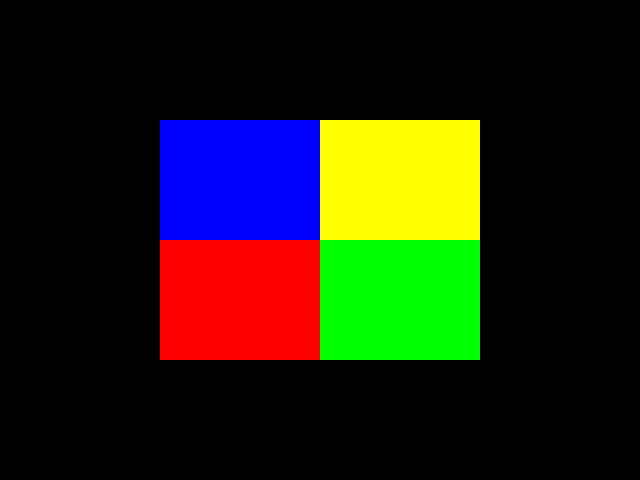

And likewise there is glTexCoordPointer which we can use on the half-cube from the previous article:
while(!glfwWindowShouldClose(window)) {
	glClear(GL_COLOR_BUFFER_BIT | GL_DEPTH_BUFFER_BIT);

	glEnable(GL_DEPTH_TEST);

	mat4 c; //Camera matrix.
	glm_mat4_identity(c);
	glm_rotate_y(c, glfwGetTime(), c);
	glm_translate(c, (vec3) {0, 0, 1});

	mat4 v;
	glm_mat4_inv(c, v);

	mat4 p;
	glm_perspective((float) 640 / 480, glm_rad(90), 0.001f, 1000.f, p);
	glMatrixMode(GL_PROJECTION);
	glLoadMatrixf((float*) p);

	glMatrixMode(GL_MODELVIEW);
	glLoadMatrixf((float*) v);

	glEnable(GL_TEXTURE_2D);

	struct Vertex {
		float px, py, pz;

		float tu, tv;
	};

	// Setup vertex information
	static float hsz = 0.2;
	struct Vertex vertices[] = {
		{-hsz, -hsz, -hsz, 0, 1},
		{+hsz, -hsz, -hsz, 1, 1},
		{-hsz, -hsz, +hsz, 1, 1},
		{+hsz, -hsz, +hsz, 0, 1},
		{-hsz, +hsz, -hsz, 0, 0},
		{+hsz, +hsz, -hsz, 1, 0},
		{-hsz, +hsz, +hsz, 1, 0},
	};

	uint16_t indices[] = {
		// -Y square
		0, 1, 2,
		2, 1, 3,
		// -X square
		0, 2, 4,
		4, 2, 6,
		// -Z square,
		0, 1, 4,
		4, 1, 5,
	};

	glEnableClientState(GL_VERTEX_ARRAY);
	glEnableClientState(GL_TEXTURE_COORD_ARRAY);

	glVertexPointer(3, GL_FLOAT, sizeof(struct Vertex), &vertices->px);

	glTexCoordPointer(2, GL_FLOAT, sizeof(struct Vertex), &vertices->tu);

	// Draw triangles, using 18 indices starting at `indices`.
	// Unsigned short is defined as being 16-bit.
	glDrawElements(GL_TRIANGLES, 18, GL_UNSIGNED_SHORT, indices);

	glDisableClientState(GL_TEXTURE_COORD_ARRAY);
	glDisableClientState(GL_VERTEX_ARRAY);

	glfwSwapBuffers(window);
	glfwPollEvents();
}
Before we end today, let's try loading a real image instead of our 2x2 example. For this, I will use stb_image, but what you're looking for is any library that will give you a raw array of pixel values, ideally in a 32-bit BGRA format.
int w, h, n;
uint8_t *buffer = stbi_load("large.jpg", &w, &h, &n, 4);

// We upload an image to
// GL_TEXTURE_2D,
// at level 0 (explained in Mipmapping),
// with the internal format GL_RGBA,
// width w,
// height h,
// border 0.
// Our buffer holds pixels of type GL_RGBA,
// unsigned bytes
// at buffer
glTexImage2D(GL_TEXTURE_2D, 0, GL_RGBA, w, h, 0, GL_RGBA, GL_UNSIGNED_BYTE, buffer);

stbi_image_free(buffer);