
Journey into OpenGL: Mipmapping
JiOGL
When rendering textures from afar, texels (texture elements) taken are spaced far away from each other, compared to neighboring screen pixels. This leads to aliasing. Dealing with this, in abstract terms, involves low-pass filtering which for images means shrinking them.
Mipmapping is the storing of a chain of textures, where each texture is half the size of the previous, and it is designed to solve the above problem. The smaller the texture drawn on the screen, the smaller the mipmap level that is chosen for rendering. This provides an anti-aliasing effect at the expense of using 33% more memory (1 + 1/4 + 1/16 + 1/64 + ... = 4/3 as each next level has 1/4 the texels).
To use mipmaps, the texture must contain data for each individual mipmap level that is expected by OpenGL. By default this means levels from 0 all the way to where the texture has size 1x1.
This can be done manually (and the instructions are very precisely specified by OpenGL), but it is often deferred to the driver.
With either GL1.4 or the SGIS_generate_mipmap extension, you may set glTexParameteri(GL_TEXTURE_2D, GL_GENERATE_MIPMAP, GL_TRUE) before uploading level 0 of the texture. With the EXT_framebuffer_object extension you can call glGenerateMipmapEXT(GL_TEXTURE_2D) after uploading level 0. With either GL3.0 or the ARB_framebuffer_object extension, you can call glGenerateMipmap(GL_TEXTURE_2D) after uploading level 0.
After that is done, mipmapping must be enabled for the texture by choosing one of the below filters:
GL_NEAREST_MIPMAP_NEAREST: nearest-neighbor filtering from a single mipmap levelGL_LINEAR_MIPMAP_NEAREST: linear filtering from a single mipmap levelGL_NEAREST_MIPMAP_LINEAR: nearest-neighbor filtering from a mixture of two mipmap levelsGL_LINEAR_MIPMAP_LINEAR: linear filtering from a mixture of two mipmap levels (trilinear filtering)
A common demonstration of mipmapping is a checkerboard:
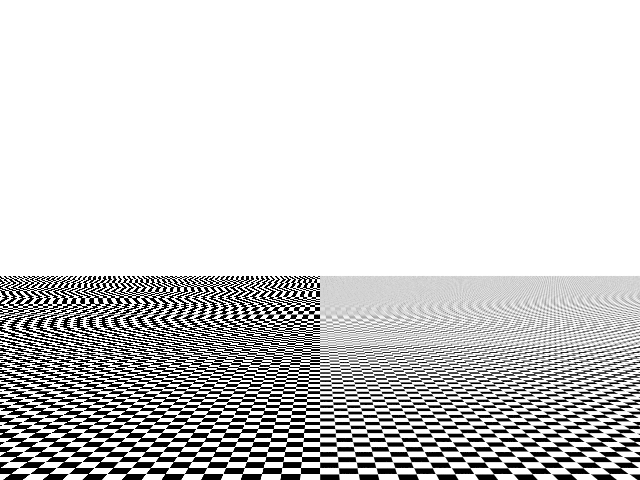
If your texture appears black, it means you've incorrectly configured the texture.
Incidentally, mipmapping solves a second problem. Textures are stored in such a way that neighboring texels are close to each other in memory, lessening cache overhead. Without mipmapping, two neighboring pixels may sample very far away texels, which can destroy rendering times. Of course, the smaller the texture, the happier the cache, so mipmapping improves both visual quality and performance!
P.S. As an anecdote, I found manual mipmap generation to produce better results when rendering alpha-tested foliage, where with automatic mipmaps the foliage was too prone to disappearing.